

Introduction: The Silent Killer of Sales Pipelines
Let me tell you about a catastrophic mistake I made in 2023.
I was consulting for a mid-sized B2B logistics company. Their sales team was complaining that their outreach campaigns were failing. They were sending embarrassing follow-ups to people who had already purchased, and multiple sales reps were calling the exact same prospects.
I logged into their CRM to investigate. What I found was a nightmare.
Out of 45,000 contact records, nearly 12,000 were duplicates. We had “John Smith,” “J. Smith,” “John S.,” and “Johnathan Smith”—all the same guy, working at the same company, but existing as four separate records. One record had his phone number, another had his recent email opens, and a third had his purchase history.
Because the data was fragmented, the sales team was flying blind.
Most companies treat CRM data hygiene like cleaning the garage: it’s a chore you put off until you absolutely have to do it. But dirty data isn’t just an annoyance; it actively destroys your sales pipeline.
Until recently, cleaning a massive CRM meant exporting everything to Excel, running clunky VLOOKUPs, and spending weeks manually merging rows. It was soul-crushing work.
Today, Artificial Intelligence has completely changed how we handle data hygiene. In this guide, I’ll show you exactly why your CRM keeps creating duplicates, the hidden dangers of basic deduplication tools, and my exact AI-driven workflow to clean your CRM automatically—without losing a single piece of critical data.
Why This Problem Happens (The “Multi-Source” Chaos)
Before we can fix the problem, we need to understand how the garbage gets in. Duplicates rarely happen because a sales rep accidentally typed a name twice. They happen because modern businesses are connected to too many tools.
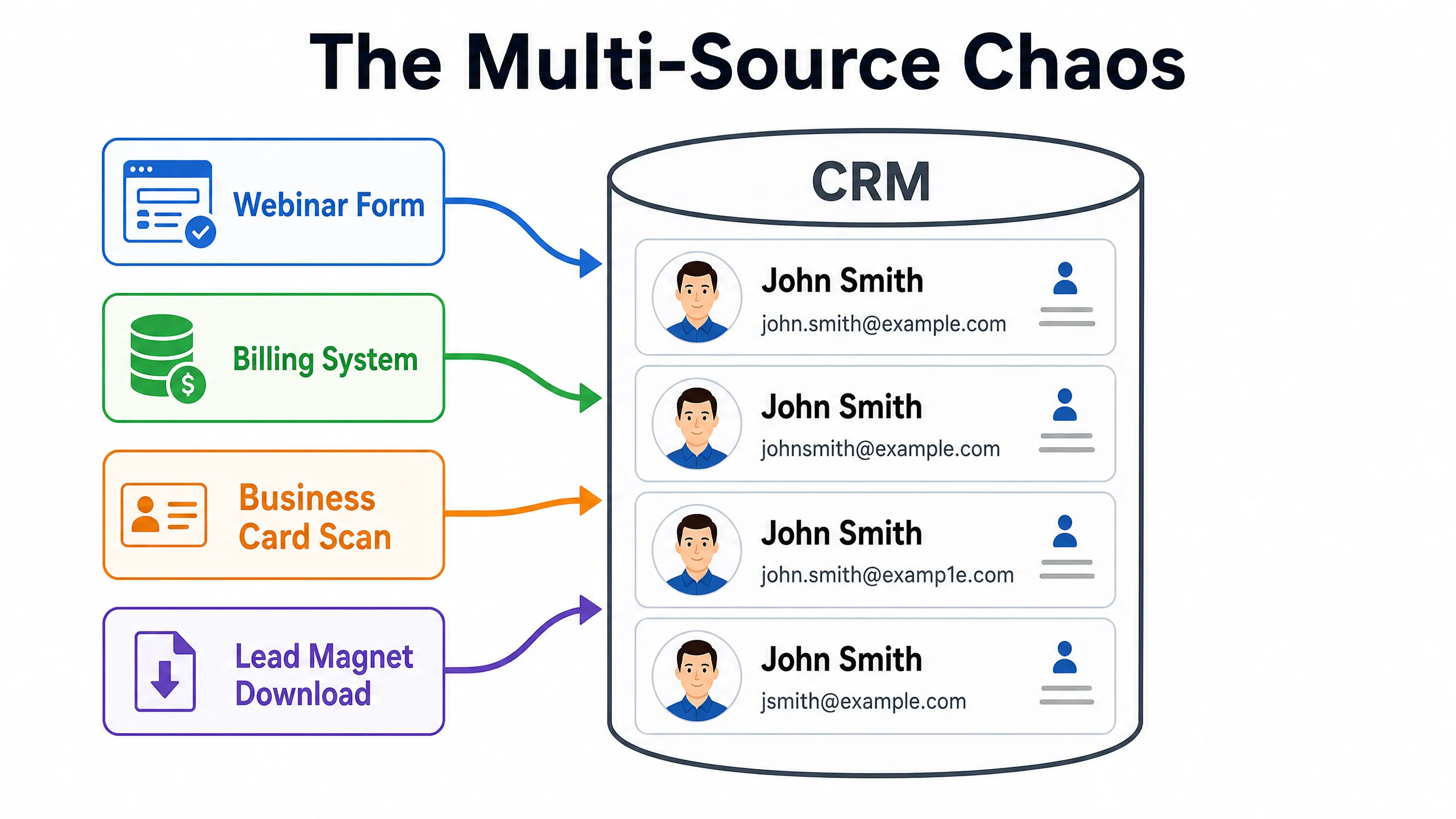
Here is the typical “Multi-Source” chaos:
- The Form Fill: John downloads a whitepaper using his personal email (
john.smith@gmail.com). Record #1 is created. - The Webinar: Two months later, John registers for a webinar using his work email (
jsmith@acmecorp.com). Record #2 is created. - The Sales Call: A sales rep meets John at a conference and scans his business card into the CRM. Record #3 is created.
- The Billing System: John finally buys, and the Stripe integration pushes the billing data back to the CRM under
john@acmecorp.com. Record #4 is created.
Most legacy CRMs use a single “Unique Identifier” (usually the exact email address) to prevent duplicates. If the email address is even slightly different, the CRM assumes it’s a different human being.
Hidden Causes Most Articles Ignore (The “Merge Conflict”)
If you Google “how to fix CRM duplicates,” most articles will tell you to use the built-in deduplication tool in your CRM.
Here is why that is terrible advice.
Basic deduplication tools use exact-match logic. They look for identical names or identical emails. They will miss “Bob Jones” and “Robert Jones.”
Worse, when you hit “Merge All,” basic tools don’t know which data to keep.
If Record A has a phone number from 2021, and Record B has a phone number from 2026, a basic merge might overwrite the new number with the old one based on the record creation date.
You haven’t cleaned your data; you’ve just destroyed it.
This is the hidden danger of “Merge Conflicts.” You need a system that understands context, not just exact text matches. You need a system that can look at “Bob Jones at Acme” and “Robert Jones at Acme Corp” and confidently say, “These are the same person, and the phone number on Robert’s record is more recent, so keep that one.”
That is where AI comes in.
The AI CRM Hygiene System™ (Step-by-Step Solution)
To solve this permanently, I developed the AI CRM Hygiene System™. This isn’t about running a one-time cleanup script. It’s about building a continuous, automated workflow.
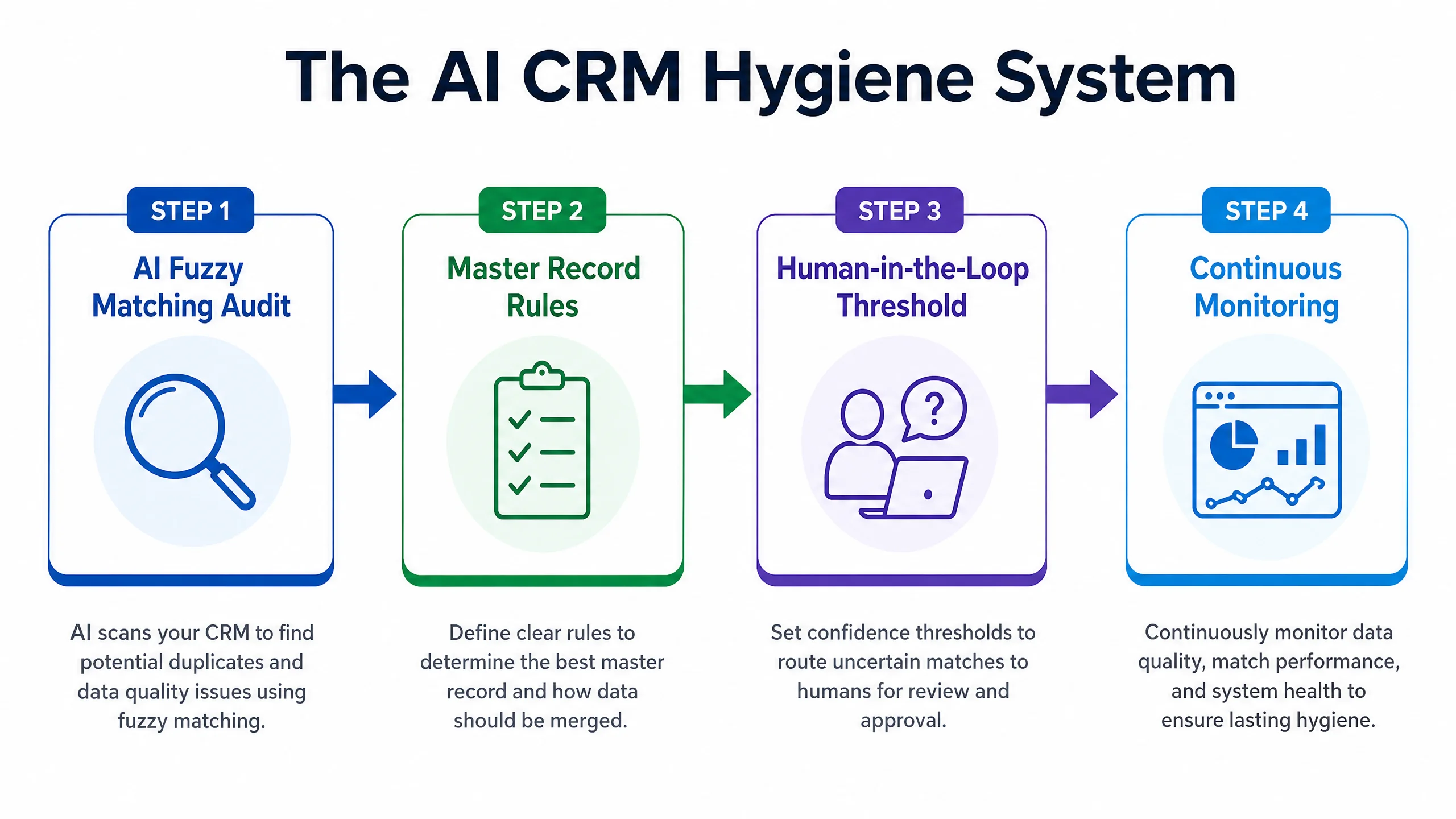
Step 1: The AI Fuzzy Matching Audit
Instead of relying on your CRM’s basic deduplication, we use AI to perform “Fuzzy Matching.” Fuzzy matching means the AI looks for similarities, not exact matches. It understands that “IBM,” “Intl Business Machines,” and “I.B.M.” are the same entity.
You can use dedicated AI data tools (like Dedupely or Insycle), but many modern CRMs are now building this in. For example, HubSpot’s Operations Hub uses machine learning to suggest merges based on name, company, website, and phone number similarities.
Step 2: Establish the “Master Record” Rules
Before you let AI merge anything, you must define the rules of engagement. When two records are merged, which data survives?
- Email Address: Keep the one with the most recent email open/click activity.
- Job Title: Keep the one updated most recently.
- Lead Source: Keep the original source (First Touch) so your marketing attribution doesn’t break.
Step 3: The Human-in-the-Loop Threshold
Never let AI auto-merge everything on day one. Set a confidence threshold.
If the AI is 99% confident it’s a duplicate (same name, same company domain, same phone number), let it auto-merge.
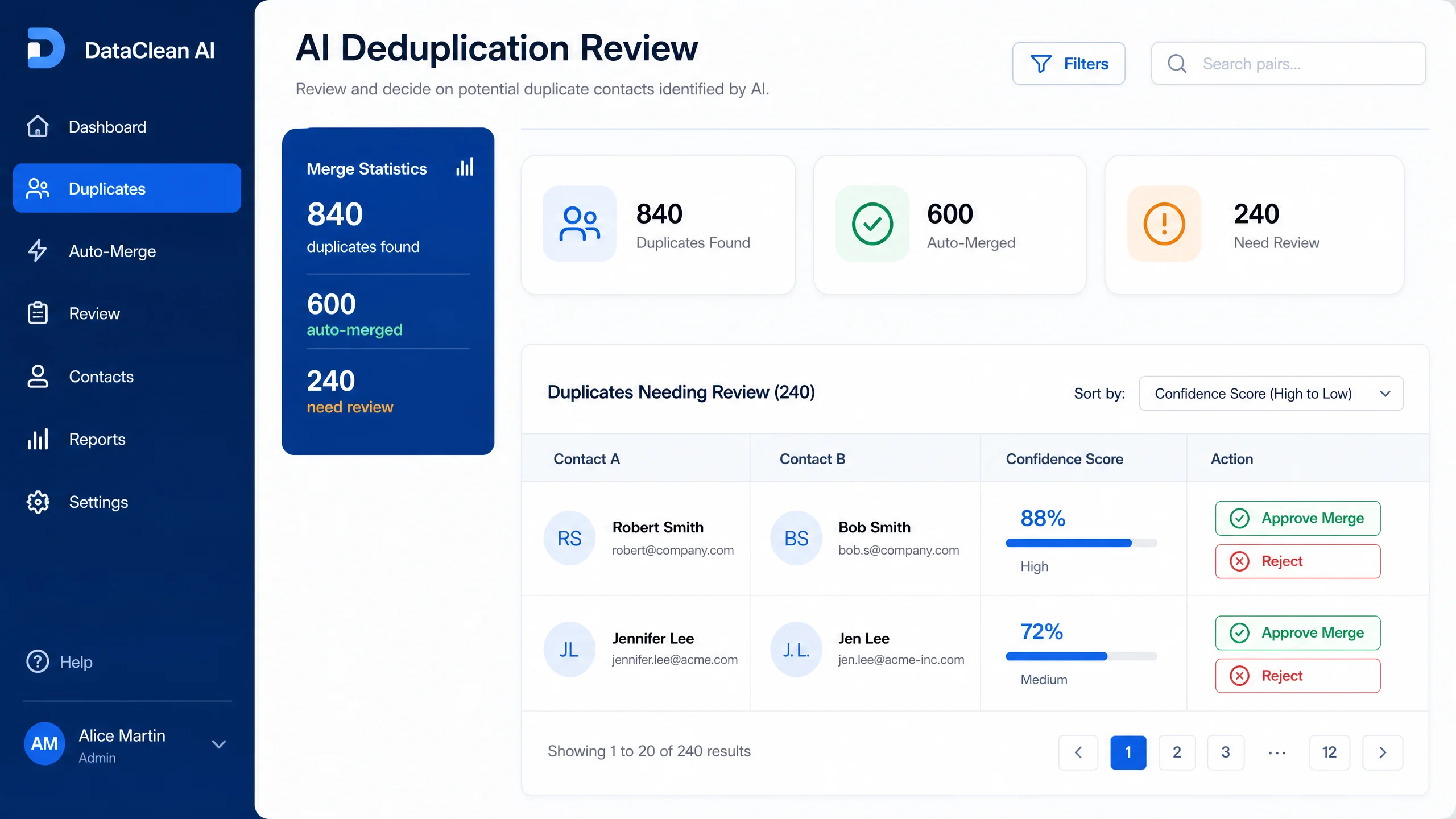
If the AI is 75% confident (similar name, different email, same city), route it to a human dashboard for a manual click-to-approve.
Real Workflow Example: Cleaning 10,000 Records in HubSpot
Let’s look at a practical example using HubSpot, which is the CRM I recommend for mid-sized businesses serious about automation.
My client had 10,000 messy records.
- The Setup: We navigated to HubSpot’s Data Quality Command Center (available in Professional/Enterprise tiers).
- The AI Scan: HubSpot’s AI automatically scanned the database in the background. It didn’t just look for identical emails; it looked at formatting errors, missing properties, and fuzzy duplicates.
- The Review: It flagged 840 potential duplicates. I didn’t have to export anything. The interface showed me Record A and Record B side-by-side.
- The Automation: For the 600 records that were obvious duplicates (identical names and companies, just different email domains), I selected them all and hit “Merge.” For the remaining 240, the sales manager spent 30 minutes reviewing the edge cases.
What used to take three weeks in Excel took us exactly 45 minutes.
If you are struggling with a fragmented database and your current CRM requires manual Excel exports to clean data, it is time to upgrade. HubSpot’s AI data tools are currently best-in-class for this specific problem. You can explore HubSpot’s CRM features and start cleaning your data here.
Mistakes To Avoid
- Merging Without Backups: Before you run any massive AI deduplication, export your entire CRM as a CSV file. If the AI makes a catastrophic error based on a bad rule you set, you need a hard backup to restore from.
- Ignoring the Source of the Leak: Cleaning your CRM is useless if you don’t fix how the duplicates are getting in. If your webinar software is creating a new contact every time instead of updating existing ones, fix the integration mapping.
- Over-Aggressive Auto-Merging: If you set the AI to automatically merge anyone with the same last name and same company, you will accidentally merge the CEO with the intern. Always keep a “Human-in-the-Loop” for lower-confidence matches.
Advanced Optimization: AI Data Enrichment
Once your duplicates are cleaned, you have a new problem: gaps in your data. You have a clean record for “Sarah Jenkins,” but you don’t have her LinkedIn profile or her company’s revenue size.
The advanced play is to connect your CRM to an AI enrichment API (like Clearbit or Apollo).
You set up an automation: When a new, clean contact is created, send the email address to the AI. The AI scrapes the web, finds the LinkedIn profile, company size, and tech stack, and automatically fills in the blank fields in your CRM.
Your sales team wakes up to a clean, fully enriched database every morning.
FAQ
Q: Will AI accidentally delete my sales notes when merging?
A: A good CRM (like HubSpot or Salesforce) will never delete activity history. When it merges Record A and Record B, it combines all the emails, notes, and call logs into one unified timeline on the Master Record.
Q: Can I use AI to clean a free CRM like Mailchimp or basic ActiveCampaign?
A: Usually, no. Free or basic email marketing tools lack the sophisticated database architecture to handle fuzzy matching. You will need to use a third-party tool like Zapier to route data to a dedicated cleaner, or upgrade to a true CRM.
Q: How often should I run an AI deduplication scan?
A: It shouldn’t be an “event.” It should be continuous. Set your AI tools to run weekly in the background and present you with a dashboard of suggested merges every Monday morning.
Final Takeaways
Dirty CRM data isn’t a vanity metric problem; it is a revenue-leaking problem. When your sales team is calling the same person twice, or your marketing team is sending conflicting emails to duplicate records, you look unprofessional and you lose deals.
- Stop relying on exact-match email deduplication. It misses 50% of the problem.
- Implement an AI system that uses Fuzzy Matching to understand context.
- Always establish clear “Master Record” rules so you don’t overwrite new data with old data.
- Keep a human in the loop for edge cases.
Your CRM is the brain of your business. Use AI to keep it sharp.