

I’ve been blogging for over six years, and if there’s one thing I wish I could go back and tell my beginner self, it’s this: don’t pick your email marketing software based purely on the word “free.”
Back in 2020, I started my first list on Mailchimp. Why? Because everyone else was doing it, and it cost me zero dollars. But as my blog grew, what seemed like a great deal turned into a massive headache. Hidden fees started popping up, my emails were landing in the “Promotions” tab, and I found myself spending more time fighting the drag-and-drop editor than actually writing content.
Eventually, I made the switch to AWeber. It wasn’t a perfect transition (no software migration ever is), but it solved three specific problems that were slowly killing my blog’s growth.
If you’re a blogger in 2026 trying to decide between AWeber and Mailchimp, you don’t need another generic feature list. You need to know how these tools actually feel to use on a Tuesday night when you’re exhausted and just want to get your newsletter out.
Let’s break down what really matters.
The Pricing Trap Nobody Talks About
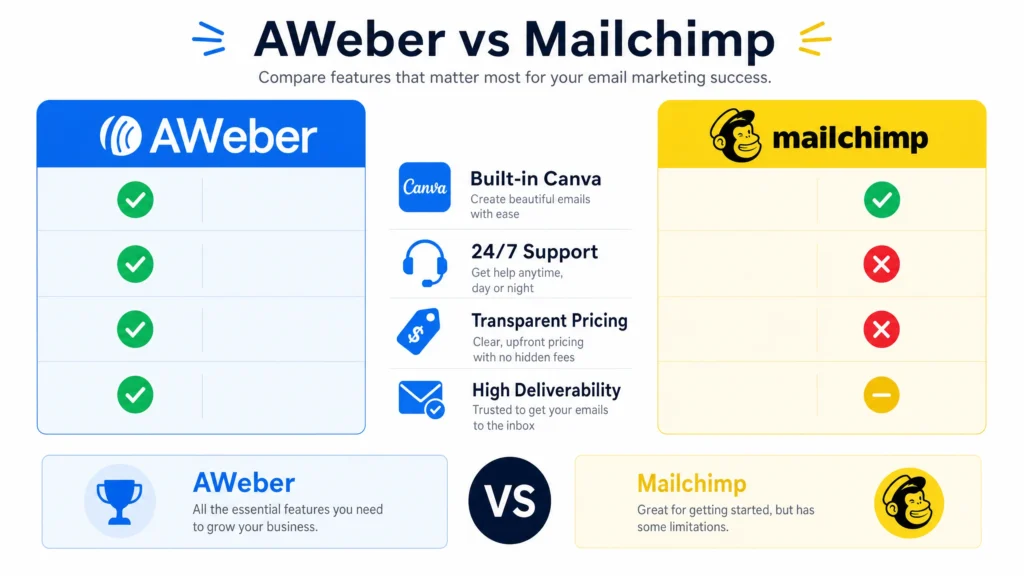
Let’s tackle the elephant in the room first. Mailchimp is famous for its free tier. It looks incredible on paper. But here’s the reality I experienced: Mailchimp charges you for unsubscribed contacts.
Yes, you read that right. If someone joins your list, decides your content isn’t for them, and hits unsubscribe, they still count toward your subscriber limit unless you manually go in and archive them. When you’re trying to grow a blog, managing your list manually is the last thing you want to be doing.
AWeber, on the other hand, plays it straight. They also offer a free plan (up to 500 subscribers), but they don’t penalize you for people who leave. More importantly, when you do inevitably outgrow the free tier, AWeber’s pricing is incredibly predictable. Their “Lite” plan starts at $12.50 a month. That’s roughly the cost of two lattes. For that, you get access to features Mailchimp locks behind much more expensive tiers, like multi-step automations.
The Canva Integration: A Lifesaver for Solo Bloggers
As a blogger, I wear a lot of hats. I write, I edit, I do basic SEO, and I try to manage social media. What I am not is a graphic designer.
When I was using Mailchimp, adding a nice header to my newsletter meant opening Photoshop (or Canva in a separate tab), designing the image, downloading it, compressing it, and uploading it to Mailchimp. It was a tedious 15-minute process every single week.
This is where AWeber completely won me over. They have Canva built directly into their email editor.
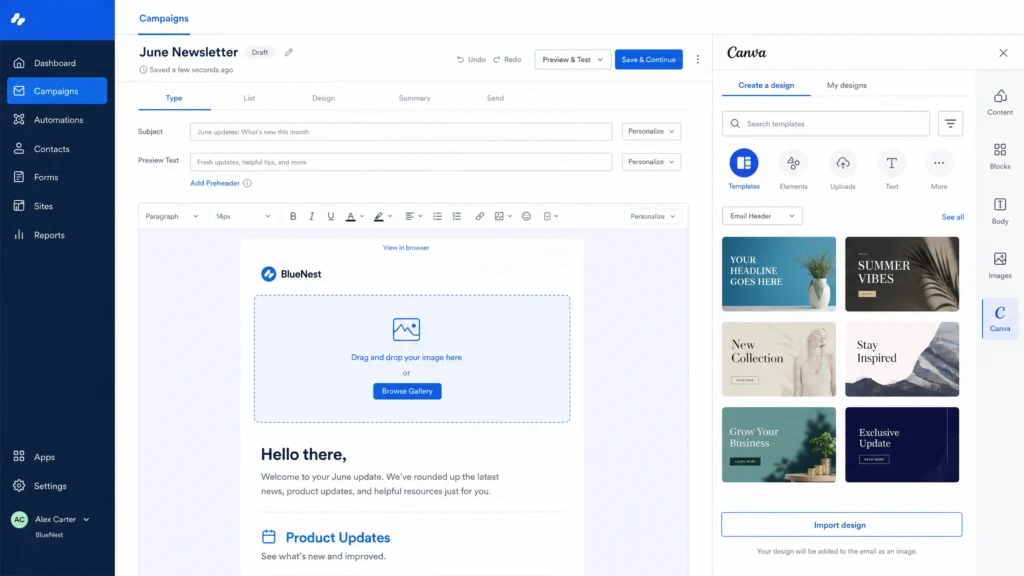
I can literally click an image block in my AWeber draft, hit “Design on Canva,” create my graphic, and it drops right into the email. I don’t have to leave the tab. I don’t have to download anything. For a solo blogger trying to save time, this feature alone justifies the switch.
The Deliverability Reality Check
You can write the most profound, life-changing blog post, but if the email announcing it lands in the spam folder, it doesn’t matter.
During my Mailchimp days, I noticed a steady decline in my open rates. After some digging, I realized a significant portion of my list was finding my emails in Gmail’s “Promotions” tab. Because Mailchimp’s free plan is so popular, their shared IP addresses are sometimes abused by less scrupulous senders, which can drag down the reputation for everyone else on that server.
When I moved my list to AWeber, my open rates jumped from about 18% to 26% within a month. I didn’t change my subject lines. I didn’t change my content. The only variable was the platform. AWeber is notoriously strict about who they let use their platform (they don’t tolerate spammers), and that strictness protects your deliverability.
The RSS-to-Email Experience
If you run a WordPress blog, you probably want a way to automatically email your list whenever you publish a new post. Both platforms offer this (usually called RSS-to-Email or Auto Newsletter).
Honestly? Both of them are a bit clunky to set up the very first time.
However, AWeber’s templates for RSS feeds look significantly more modern out of the box. Mailchimp’s default RSS templates look like they haven’t been updated since 2015. With AWeber, I was able to set up an automated weekly digest that pulls in my latest post title, featured image, and excerpt, and it actually looks like a premium newsletter, not a robotic feed dump.
When Things Go Wrong (Customer Support)
Tech breaks. It’s inevitable. One Friday evening, I accidentally deleted a crucial automation sequence right before a big launch. Panic set in.
With Mailchimp’s lower tiers, getting a human on the phone or live chat is incredibly difficult. You are usually pushed toward their knowledge base articles.
AWeber’s support team is based in Pennsylvania, and they offer 24/7 live chat and email support. I hopped on the chat, explained my mistake, and a real human named Dave helped me restore a backup of my sequence within ten minutes. That peace of mind is invaluable when your blog starts generating real revenue.
My Final Verdict
If you are running a massive e-commerce store with thousands of SKUs and a dedicated marketing team, Mailchimp’s complex CRM features might be what you need.
But if you are a blogger, a creator, or a solo entrepreneur in 2026? AWeber is the clear winner.
It doesn’t try to be everything to everyone. It focuses on doing the essentials perfectly: delivering emails to the inbox, making the design process painless with Canva, and offering transparent pricing that doesn’t punish you for growing.
If you’re ready to start building your blog’s audience without the technical headaches, you can grab a free AWeber account right here.