

Introduction: The “You Forgot Something” Fatigue
If I get one more email with the subject line “Oops! You left something in your cart,” I might scream.
As consumers, we have become completely blind to the standard abandoned cart email. We know exactly what it is, we know why we got it, and we know that if we just wait another 24 hours, a 10% discount code will magically appear in our inbox.
Last year, I was managing email marketing for a boutique Shopify store selling high-end ceramic cookware. Their abandoned cart recovery rate was stuck at a dismal 4.2%. They were using the default Shopify automation. It sent the exact same plain-text email to the person who abandoned a $15 mug as it did to the person who abandoned a $400 dinnerware set.
It was lazy marketing, and it was costing them thousands of dollars a week.
We didn’t just need a new template; we needed a smarter system. We needed a workflow that could look at what the customer abandoned, how many times they had purchased before, and dynamically adjust the messaging and the discount offer using AI.
When we implemented the AI Ecommerce Conversion Loop™ I’m about to show you, their recovery rate jumped to 14.7% in thirty days.
In this guide, I will break down exactly why generic abandoned cart emails fail, the hidden logic behind AI-driven recovery, and the step-by-step workflow you can build in your Shopify store today.
Why This Problem Happens (The “One Size Fits All” Fallacy)
The fundamental flaw with traditional abandoned cart emails is a lack of context.
When a customer abandons a cart, they do it for a specific reason.
- Customer A abandoned a high-ticket item because the shipping cost was too high.
- Customer B abandoned a low-ticket item because they got distracted by a text message.
- Customer C is a VIP buyer who abandons carts on purpose because they know your discount sequence.
If you send all three of these people the exact same email, you are leaving money on the table. You might be giving away a 20% discount to Customer B (who just needed a gentle reminder), while failing to overcome Customer A’s shipping objection.
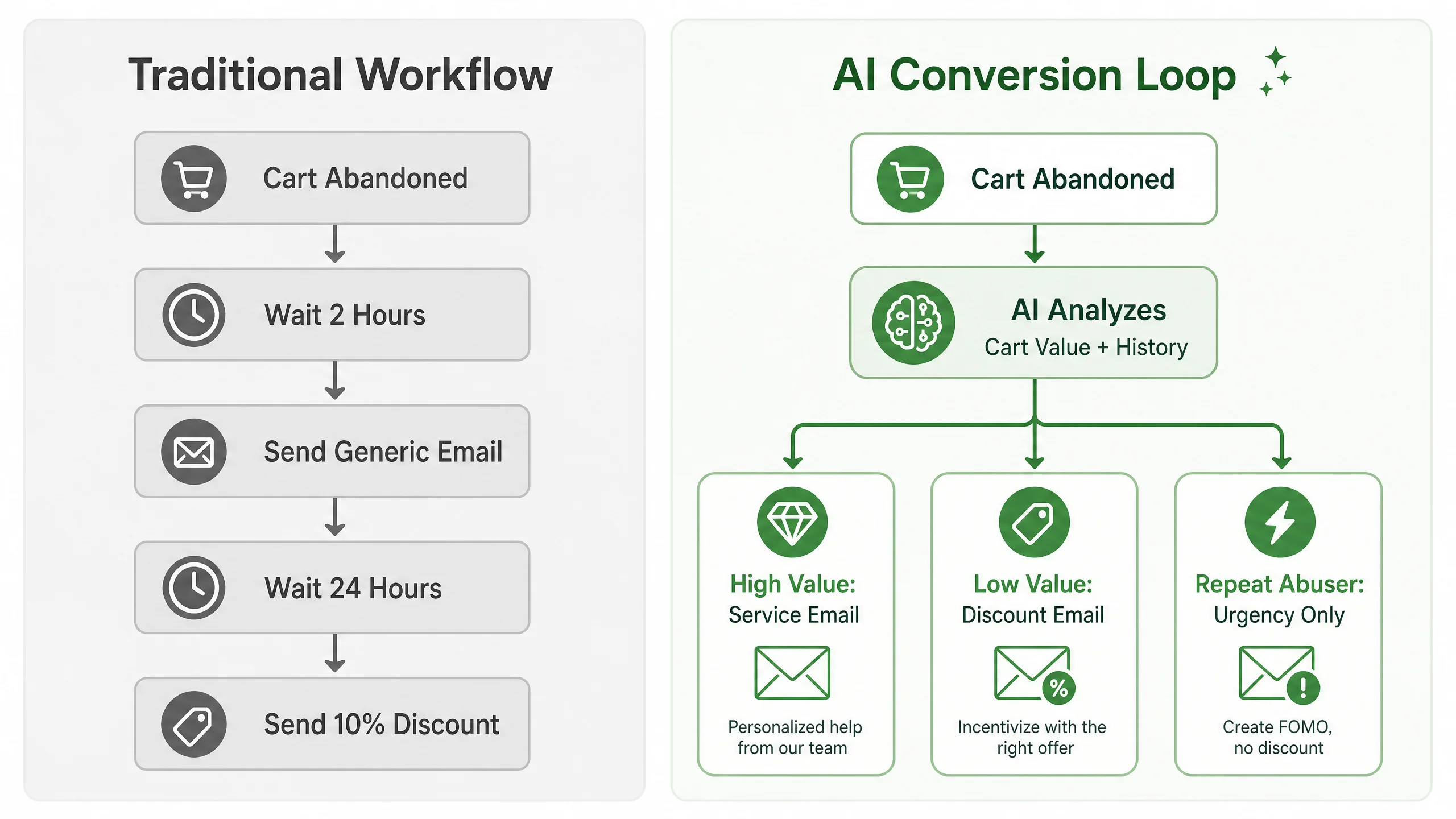
Traditional email platforms force you to build incredibly complex, manual flowcharts to handle these different scenarios. It takes hours to set up and is a nightmare to maintain.
Hidden Causes Most Articles Ignore (The Margin Destroyer)
Most articles on this topic will tell you to “just use AI to write a funnier subject line.” That is a superficial fix.
The real hidden cause of abandoned cart failure is Margin Destruction via Static Discounts.
If your default sequence always offers a 15% discount on email #2, you are training your customers to abandon their carts. You are also destroying your profit margins on low-ticket items.
The true power of AI in ecommerce isn’t just writing text; it’s Predictive Incentive Modeling. An AI-powered workflow analyzes the customer’s historical behavior and the specific margins of the items in their cart.
It asks: What is the absolute minimum incentive required to convert this specific user?
For a first-time buyer with a $200 cart, the AI might generate a “Free Expedited Shipping” offer. For a loyal VIP with a $40 cart, it might just send a text-only reminder from the founder. By using AI to dynamically generate the offer, you protect your margins while maximizing the conversion rate.
The AI Ecommerce Conversion Loop™ (Step-by-Step Solution)
To build this, you need an email marketing platform that deeply integrates with Shopify and has native AI capabilities. While Klaviyo is the industry standard, I actually prefer Omnisend for this specific workflow because their AI segmentation is incredibly intuitive for non-developers.
Here is how to build the AI Ecommerce Conversion Loop™.
Step 1: The AI Segmentation Split
Do not start your workflow with an email. Start it with an AI condition split.
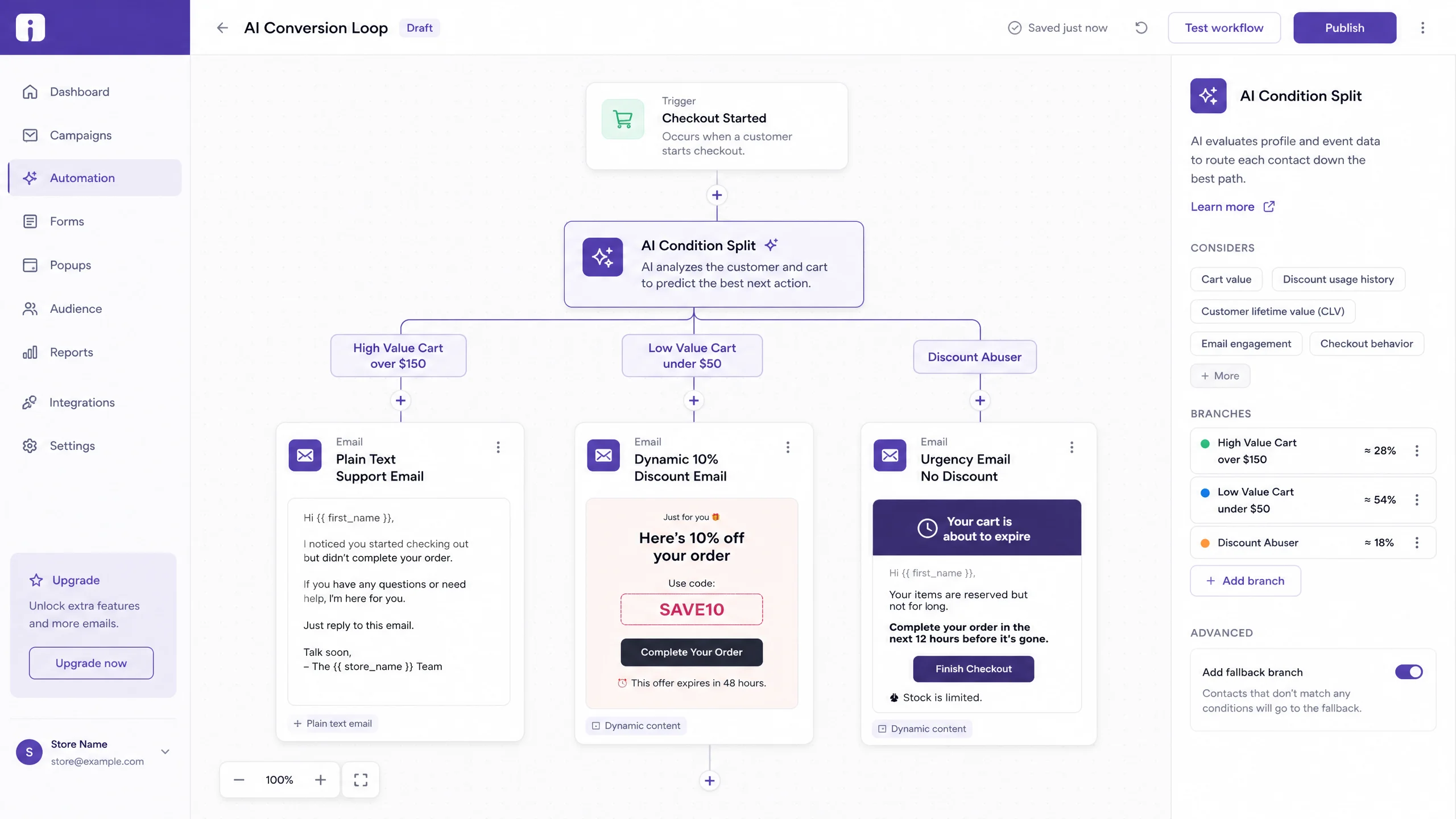
When a cart is abandoned, the workflow should immediately query the AI engine to categorize the user into one of three buckets:
- High Intent / High Value: Cart value > $150 OR past purchase history > 2.
- Low Intent / Low Value: Cart value < $50 AND no past purchases.
- Discount Abuser: Has abandoned a cart and used a recovery discount code in the last 60 days.
Step 2: The “Service First” Email (Hour 2)
For the High Intent bucket, the first email is not a discount. It is an AI-generated plain-text email that looks like it came from a customer service rep.
AI Prompt to generate this: “Write a 3-sentence, plain-text email from ‘Sarah in Customer Success’. Note that the customer left [Product Name] in their cart. Ask if they had any technical issues checking out or if they have questions about the product’s sizing. Do not offer a discount.”
This email feels personal and frequently gets direct replies, which massively boosts your domain deliverability.
Step 3: The Dynamic Incentive Email (Hour 24)
If they haven’t purchased, it’s time for the incentive. But instead of a static code, we use dynamic blocks.
- For High Intent users, the AI generates a unique, time-sensitive “Free Shipping” code.
- For Low Intent users, the AI generates a unique “10% off” code.
- For Discount Abusers, the AI sends an urgency email (“Your cart expires in 2 hours”) with NO discount.
Step 4: The AI Product Recommendation (Hour 48)
If they still haven’t bought the original item, they probably aren’t going to. The final email uses the AI recommendation engine. It looks at the abandoned item and automatically populates the email with 3 lower-priced alternatives or complementary products from your Shopify catalog.
Real Workflow Example: The Ceramic Cookware Store
Let’s look at how this played out for my cookware client.
A customer abandoned a $250 Dutch Oven.
Old Workflow:
- Hour 2: “Oops, you forgot your Dutch Oven!” (Ignored)
- Hour 24: “Here is 10% off your Dutch Oven!” (Customer realized shipping was still $30, ignored)
New AI Conversion Loop:
- Hour 2: Plain text email from the founder: “Hey, saw you looking at the Dutch Oven. A lot of people ask if it’s induction-compatible—it is! Let me know if you have other questions.” (Customer opened, didn’t reply).
- Hour 24: AI recognized the cart value was high and shipping was the likely friction point. Email: “We want to help you upgrade your kitchen. Here is a unique code for Free Priority Shipping on your Dutch Oven, valid for 12 hours.” (Customer converted).
We didn’t discount the $250 product (saving $25 in margin). We ate the $15 shipping cost instead, resulting in a more profitable sale.
If you want to implement this exact dynamic workflow, you need a tool built for Shopify. You can explore Omnisend’s AI features and start building this workflow for free right here.
Mistakes To Avoid
- Using AI to Write “Witty” Copy: Do not prompt the AI to “write a funny abandoned cart email.” AI humor is almost always cringeworthy and unprofessional. Keep the tone helpful, direct, and brand-aligned.
- Ignoring Inventory Levels: Ensure your workflow checks Shopify inventory before sending the Hour 48 email. There is nothing worse than sending an aggressive recovery email for a product that just sold out.
- The “Frankenstein” Design: If your AI tool generates HTML emails, make sure the styling matches your brand. A plain-text email works great, but a poorly formatted HTML email looks like spam.
Advanced Optimization: Predictive Send Times
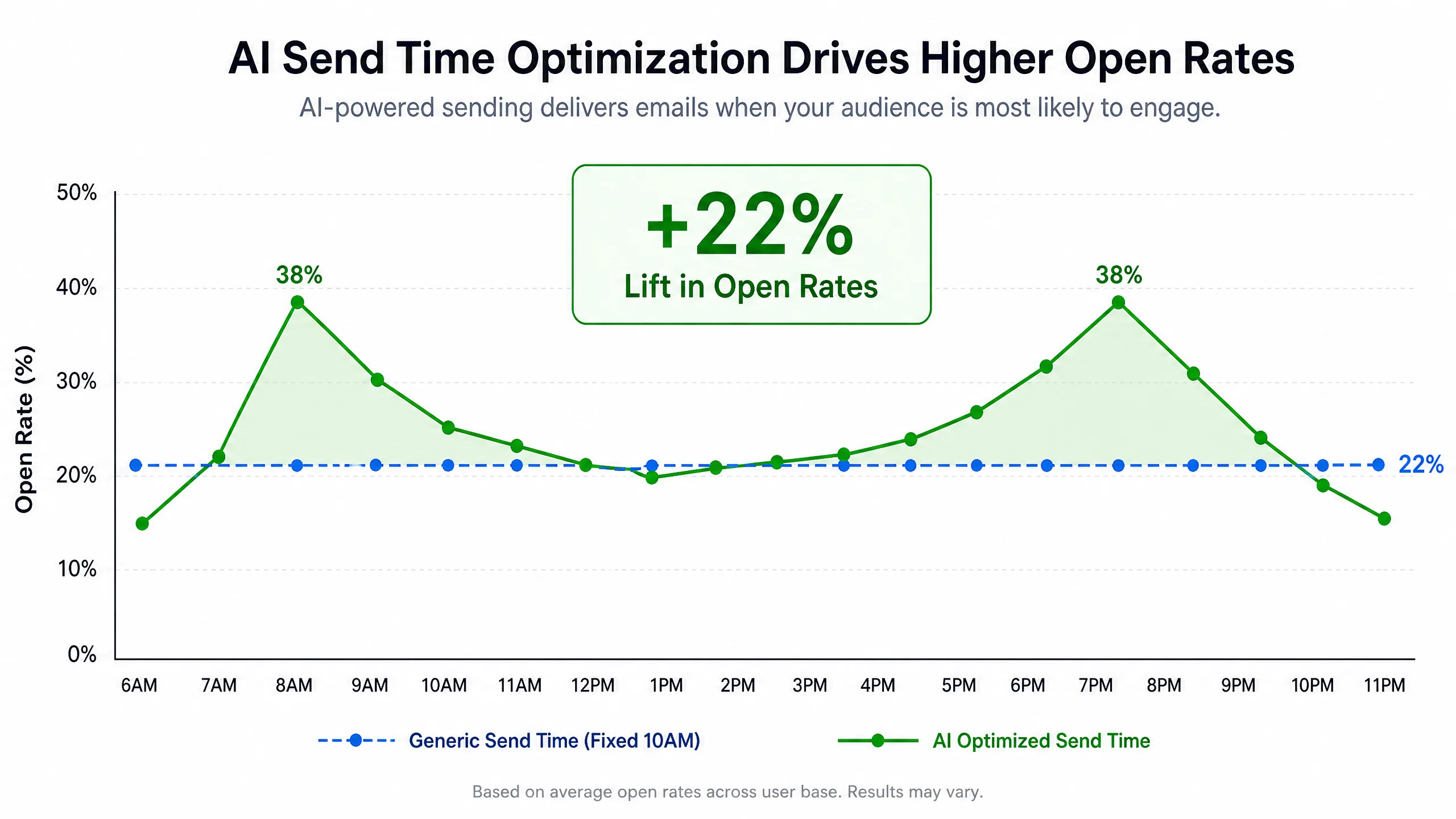
Once the core logic is built, you can turn on AI Send Time Optimization (STO).
Instead of hard-coding “Wait 24 Hours” for email #2, the AI analyzes when that specific user historically opens their emails. If Customer A usually checks their email on their commute at 8:00 AM, the system will hold the email and deliver it exactly at 7:55 AM, regardless of when they abandoned the cart. This one tweak can lift open rates by an additional 15-20%.
FAQ
Q: Do I need a developer to set up dynamic AI discounts in Shopify?
A: Not anymore. Modern apps like Omnisend and Klaviyo have native Shopify integrations. You can drag and drop a “Dynamic Discount” block into the email editor, and the app automatically generates and syncs the unique codes with your Shopify backend.
Q: Will this workflow annoy my customers?
A: It annoys them less than the traditional method because it is highly relevant. A plain-text check-in email feels like customer service, not marketing.
Q: Can I use basic tools like Mailchimp for this?
A: Mailchimp has basic abandoned cart features, but their AI segmentation and dynamic Shopify discount generation are not as robust as purpose-built ecommerce tools like Omnisend.
Final Takeaways
The days of setting up a generic 3-part abandoned cart sequence and forgetting about it are over. Consumers are too smart, and your margins are too precious.
To build a recovery workflow that actually converts in 2026:
- Stop treating all abandoned carts equally.
- Use AI to segment users based on cart value and purchase history before sending the first email.
- Protect your margins by using dynamic incentives (like free shipping) instead of blanket percentage discounts.
- Use plain-text, “service-first” emails to build trust and bypass the Promotions tab.
Your abandoned cart revenue shouldn’t be an accident. Build a smart system, and let the AI do the heavy lifting.