

Introduction: The “Thanks for Subscribing” Tragedy
I review a lot of email funnels for clients. Last month, I audited a funnel for a SaaS startup that was spending $5,000 a month on Facebook ads to drive lead magnet downloads.
They were getting leads at a decent price. But their conversion rate to paid users was near zero.
I checked their welcome email. It read: “Hello [First Name], Thank you for subscribing to our newsletter. We are excited to have you. Here is your download. Best regards, The Team.”
That was it. No follow-up. No story. No introduction. Just a digital receipt.
The welcome sequence is the most opened, most clicked, and most profitable series of emails you will ever send. When someone joins your list, they are raising their hand and saying, “I have a problem, and I think you might be able to help me.” If you meet that enthusiasm with a generic “thanks for subscribing” autoresponder, you are throwing money into a fire.
Many creators try to fix this by asking ChatGPT to “write a 5-day welcome sequence.” The result is usually a horrifyingly robotic, overly enthusiastic mess full of words like “delve,” “unlock,” and “in today’s fast-paced digital landscape.”
In this guide, I am going to show you my exact process for building an AI-powered welcome sequence. We are going to use AI to do the heavy lifting of structure and psychology, but we are going to use a specific editing framework to make sure it sounds exactly like you.
Why This Problem Happens (The Blank Page vs. The Robot)
When it comes to welcome sequences, marketers usually fall into one of two traps:
- The Blank Page Paralysis: You know you need a 5-day sequence. You sit down to write it. You stare at the blinking cursor. You write one email, get overwhelmed by the thought of writing four more, and abandon the project.
- The Robot Delegation: You outsource the entire job to AI with a single prompt. The AI generates a sequence that is grammatically perfect but completely devoid of soul. Your subscribers read it, realize it was written by a machine, and immediately disengage.
The core issue is a misunderstanding of what AI is actually good at. AI is not a copywriter. AI is a structural architect.
If you ask AI to be creative, it defaults to cliches. But if you ask AI to build a psychological framework based on proven marketing principles, it is brilliant.
Hidden Causes Most Articles Ignore (The “Soap Opera” Missing Link)
Most tutorials on AI email writing focus on “prompt engineering hacks.” They tell you to tell the AI to “act like Dan Kennedy” or “write in a witty tone.”
This ignores the fundamental architecture of a high-converting welcome sequence: The Soap Opera Sequence.
Coined by Russell Brunson, the Soap Opera Sequence relies on high drama, open loops, and cliffhangers. You don’t just send five random emails. You send a cohesive story that pulls the reader from one day to the next, exactly like a daytime soap opera.
If you don’t explicitly force the AI to use this specific architectural framework, it will just generate five standalone, boring essays.
Here is the 5-part architecture we need to force the AI to build:
- Set the Stage & Deliver the Bribe (Day 1)
- High Drama & The Backstory (Day 2)
- The Epiphany & The Solution (Day 3)
- The Hidden Benefits (Day 4)
- The Urgent Call to Action (Day 5)
The AI Soap Opera Framework™ (Step-by-Step Solution)
Here is exactly how I build these sequences. I use Claude (or ChatGPT) for the drafting, and then I move the copy into an email service provider like AWeber for the actual automation.
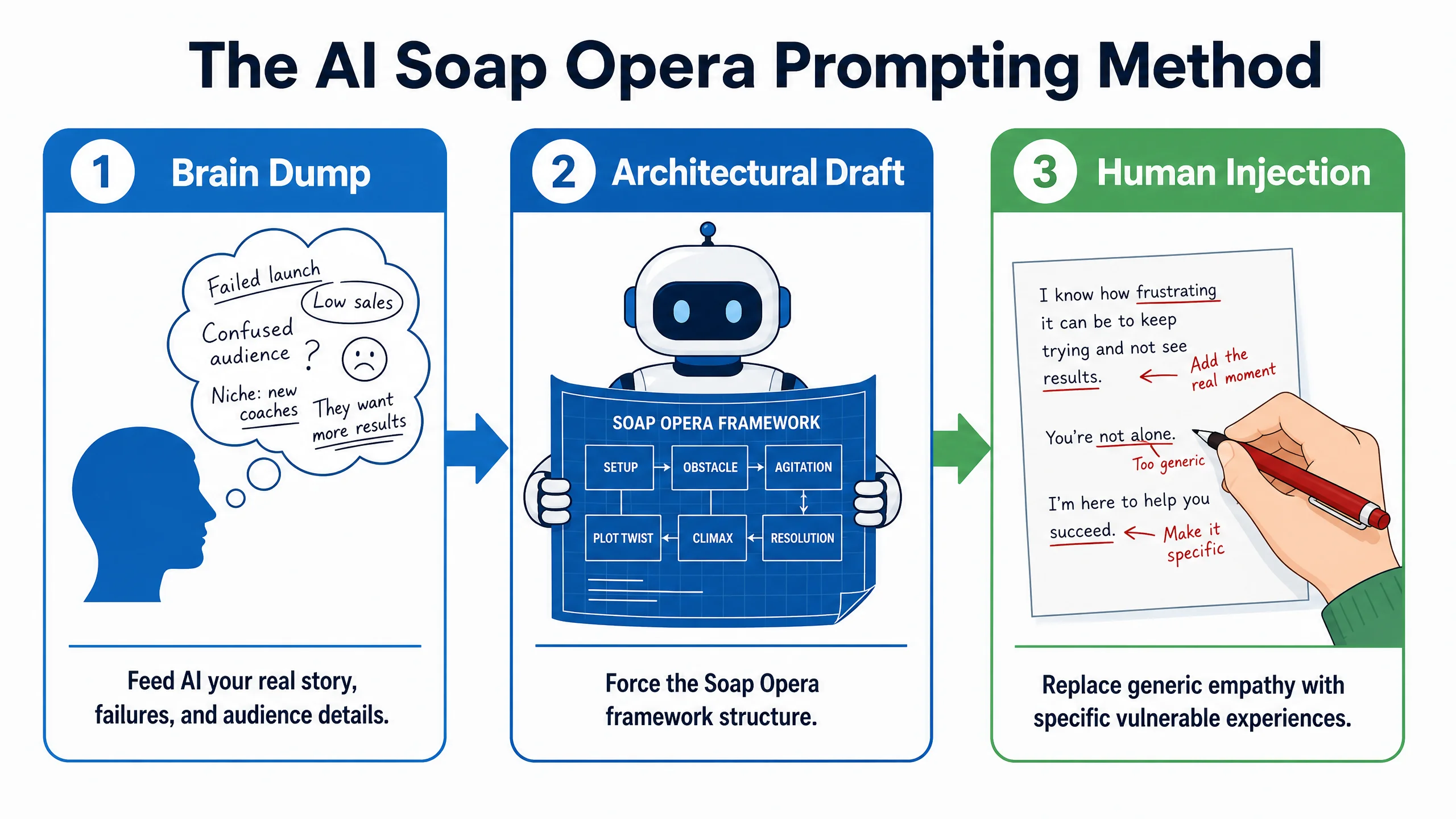
Step 1: The “Brain Dump” Prompt
Do not ask the AI to write the emails yet. First, you must feed it your raw, messy human experience.
Open your AI tool and paste this exact prompt, filling in the brackets:
“I need to write a 5-day welcome email sequence. Before you write anything, I want you to understand my story. My target audience is [Target Audience]. Their biggest pain point is [Pain Point]. I used to struggle with this too. My lowest point was when [Share a specific, embarrassing, or frustrating failure story]. Then I discovered [The Epiphany/Solution]. Now, I offer [Your Product/Service] which helps them achieve [Ultimate Goal]. Acknowledge you understand this story, and wait for my next prompt.”
Step 2: Generating the Architectural Draft
Now that the AI understands your specific “Scar Tissue” (your real struggles), we force it into the Soap Opera framework.
“Now, draft a 5-day ‘Soap Opera’ welcome sequence based on my story.
Day 1: Deliver the lead magnet and tease tomorrow’s story.
Day 2: Tell my failure story. End on a cliffhanger right before I found the solution. Day 3: Reveal the epiphany and softly introduce my product.
Day 4: Share a hidden benefit or a case study.
Day 5: Make a strong pitch for my product.
Constraints: Use short sentences. No paragraph longer than 3 lines. Do not use words like ‘unlock,’ ‘delve,’ ‘crucial,’ or ‘moreover.’ Write at a 6th-grade reading level.”
Step 3: The “Human Injection” Edit
The AI will give you a very solid 80% draft. Now you must do the 20% human work.
Read through the draft. Look for any sentence that sounds too polished.
- AI Draft: “I experienced a significant setback that forced me to reevaluate my strategy.”
- Your Edit: “I literally cried in my car after the client fired me.”
Inject your specific slang, your weird quirks, and exact numbers. This is what makes the email yours.
Step 4: Building the Automation in Your ESP
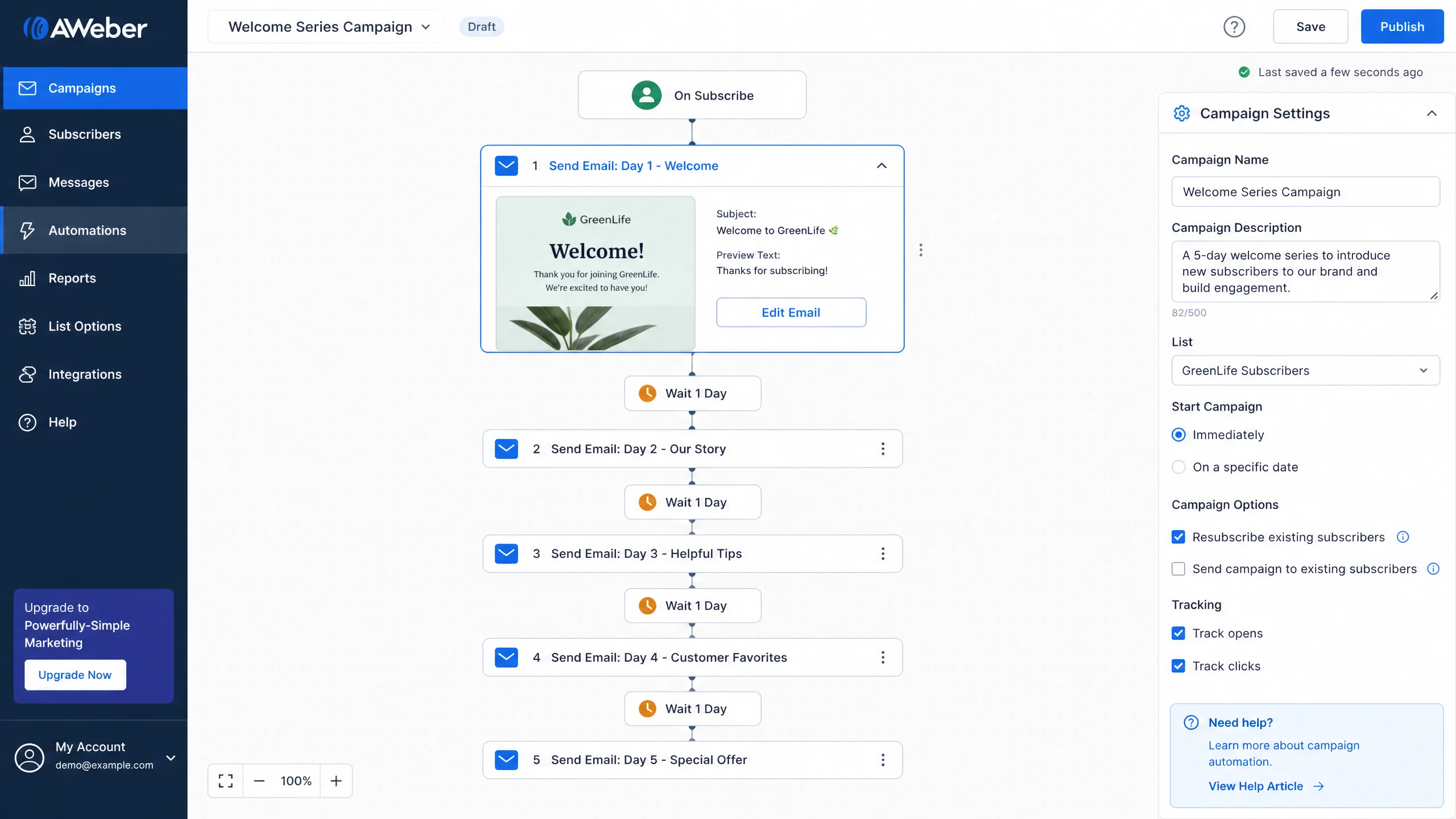
Copying and pasting is the easy part. You need a tool that makes the automation visual. I prefer AWeber for this because their campaign builder is incredibly intuitive for beginners.
- Log into AWeber and go to Automations > Campaigns.
- Click Create a Campaign and choose a Blank Campaign.
- Set the Trigger to “On Subscribe.”
- Drag a “Send Message” block onto the canvas. Paste your Day 1 email here.
- Drag a “Wait” block and set it to 1 day.
- Repeat this process until all 5 days are built.
Real Workflow Example: The Fitness Coach
I ran this exact framework for a fitness coach client. She was terrified of sounding “salesy.”
Her “Brain Dump” included the fact that she used to secretly eat entire sleeves of Oreos in her car because restrictive diets made her miserable.
The AI drafted a Day 2 email that told the “Oreo story” perfectly. We tweaked a few words, added a picture of her in her car, and set it up in AWeber.
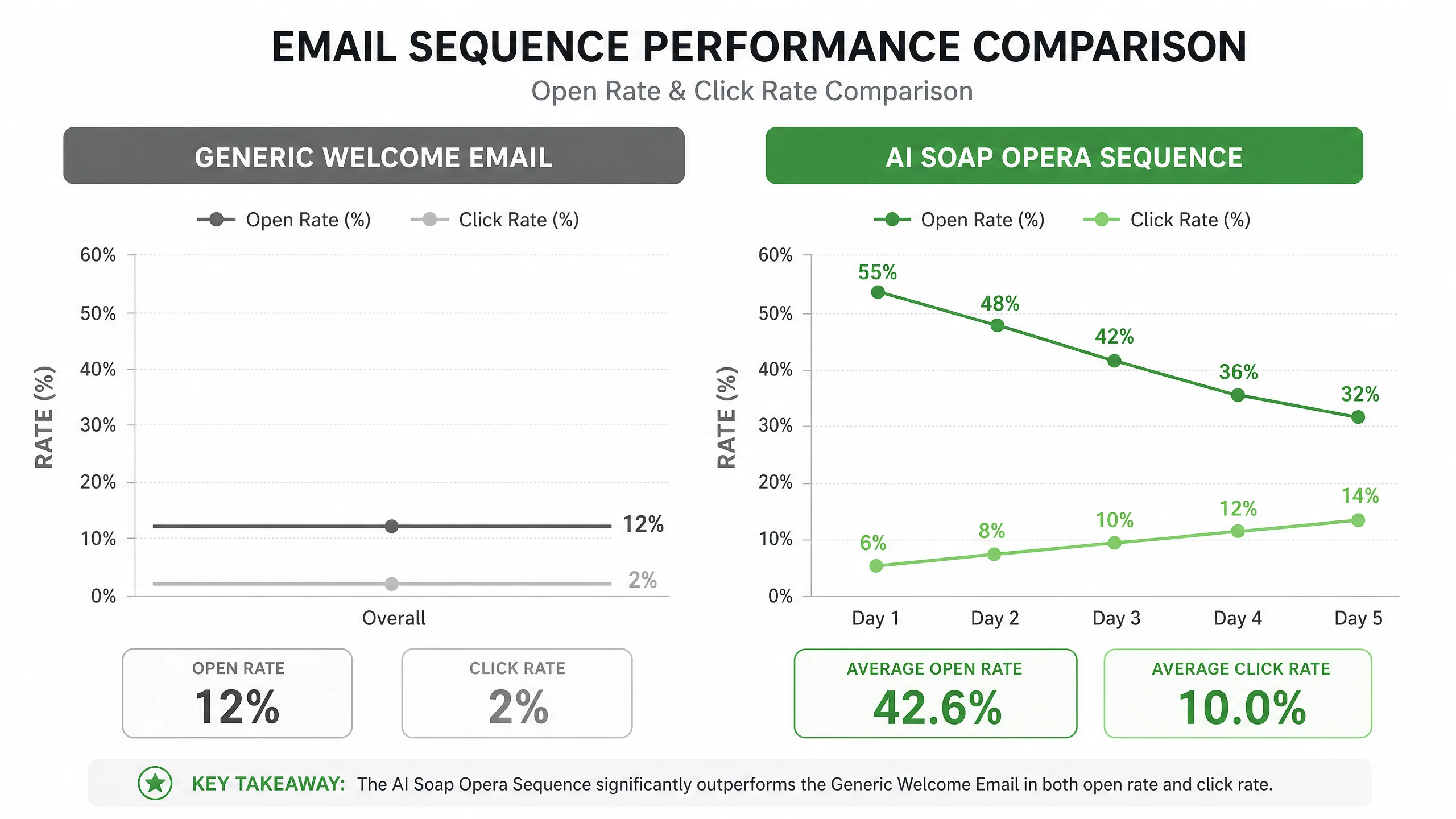
Her previous generic welcome email had a 2% click rate. The new AI-architected, human-edited Soap Opera sequence generated a 14% click rate on Day 5, resulting in 8 new high-ticket coaching clients in the first month.
If you want to build a visual sequence like this without fighting with clunky software, you can start a free trial of AWeber here and build your campaign today.
Mistakes To Avoid
- Forgetting the “From” Name: Don’t send emails from “Info@Company.com”. Send them from “Your Name | Company”. People open emails from people.
- Too Many Links in Day 1: Day 1 should have exactly one link: the link to download whatever freebie you promised them. Do not ask them to follow you on Instagram, read your blog, and buy your course in the first email.
- Ignoring the Preview Text: The preview text (the little snippet of text next to the subject line in an inbox) is prime real estate. Don’t let it default to “View this email in your browser.” Use it to build curiosity.
Advanced Optimization: Behavioral Branching
Once your basic 5-day sequence is running, you can use AI to make it smarter.
What happens if someone buys your product on Day 3? You shouldn’t send them the Day 4 and Day 5 pitch emails. That’s annoying.
In your email platform, you can set up an automation rule: If User applies tag “Customer,” immediately remove them from the “Welcome Sequence” campaign. This ensures your marketing always matches the user’s current status.
FAQ
Q: Should I use ChatGPT or Claude for email writing?
A: Currently, Claude 3.5 Sonnet is significantly better at copywriting than ChatGPT. It sounds much more natural and is better at following negative constraints (like “don’t use corporate jargon”).
Q: How long should each email be?
A: There is no perfect length, but aim for 300-500 words. Long enough to tell a story, short enough to read on a phone while waiting in line for coffee.
Q: Can I use ConvertKit instead of AWeber?
A: Absolutely. ConvertKit has excellent visual automation builders as well. I generally recommend AWeber for those who want a slightly easier learning curve and 24/7 live support, while ConvertKit is great for advanced creators.
Final Takeaways
An AI-generated welcome sequence will only ever be as good as the raw human experience you feed into it.
- Stop treating AI as a copywriter and start treating it as a structural architect.
- Use the “Brain Dump” method to give the AI your real stories and failures.
- Force the AI to use the Soap Opera Sequence framework to build narrative tension.
- Manually edit the draft to inject your specific “Scar Tissue.”
- Use a visual automation builder to ensure the emails go out reliably.
Your welcome sequence is your digital first impression. Don’t leave it to a generic robot, but don’t let the blank page stop you from building it. Use AI to bridge the gap.