

Introduction: The “Copy-Paste” Disaster
I was brought in to audit a Shopify store selling sustainable outdoor gear late last year. The founder was panicking. Over the course of three months, their organic search traffic had plummeted by 60%.
They hadn’t changed their technical SEO. They hadn’t lost any major backlinks.
I looked at their product pages. They had recently added 400 new SKUs to their catalog. To save time, the founder had used a cheap AI Shopify app to bulk-generate the product descriptions.
I read the description for a basic titanium camping mug. It started like this: “In today’s fast-paced digital landscape, finding the perfect camping mug is crucial. Elevate your outdoor experience and unlock the power of hydration with our revolutionary titanium vessel…”
It was a disaster. It sounded like a robot trying to sell software, not a human talking about a coffee mug.
Google’s algorithms are increasingly sophisticated at identifying “unhelpful, mass-produced content.” When a search engine sees 400 pages of generic, repetitive fluff that provides no unique value to the shopper, it demotes the entire site.
Using AI to write product descriptions is not inherently bad. In fact, for a store with thousands of SKUs, it is absolutely necessary for survival. The problem is the workflow. If your workflow consists of clicking a “Generate” button and immediately hitting “Publish,” you are playing Russian roulette with your SEO.
In this guide, I will show you exactly why standard AI generators fail, the hidden SEO risks most merchants ignore, and the exact “Human-in-the-Loop” workflow I use to generate thousands of product descriptions that actually rank and convert.
Why This Problem Happens (The “Feature Vomit” Fallacy)
When you use a basic AI product description generator, you typically input a list of features: Titanium, 12oz, lightweight, folding handles.
The AI takes those features and wraps them in flowery adjectives. It creates what I call “Feature Vomit.” It tells the customer what the product is, but it completely fails to tell them why they should care.
Great copywriting is about translating features into benefits.
- Feature: Folding handles.
- Benefit: Fits easily into your crammed backpack so you don’t have to leave your extra socks behind.
AI doesn’t know what it feels like to pack a crammed backpack in the freezing rain. It doesn’t have human empathy. Therefore, by default, it cannot write compelling benefits. It can only hallucinate adjectives.
When every product description on your site reads like an emotionless list of features wrapped in adjectives, your conversion rate tanks because the customer feels no connection to the product.
Hidden Causes Most Articles Ignore (The “Cannibalization” Risk)
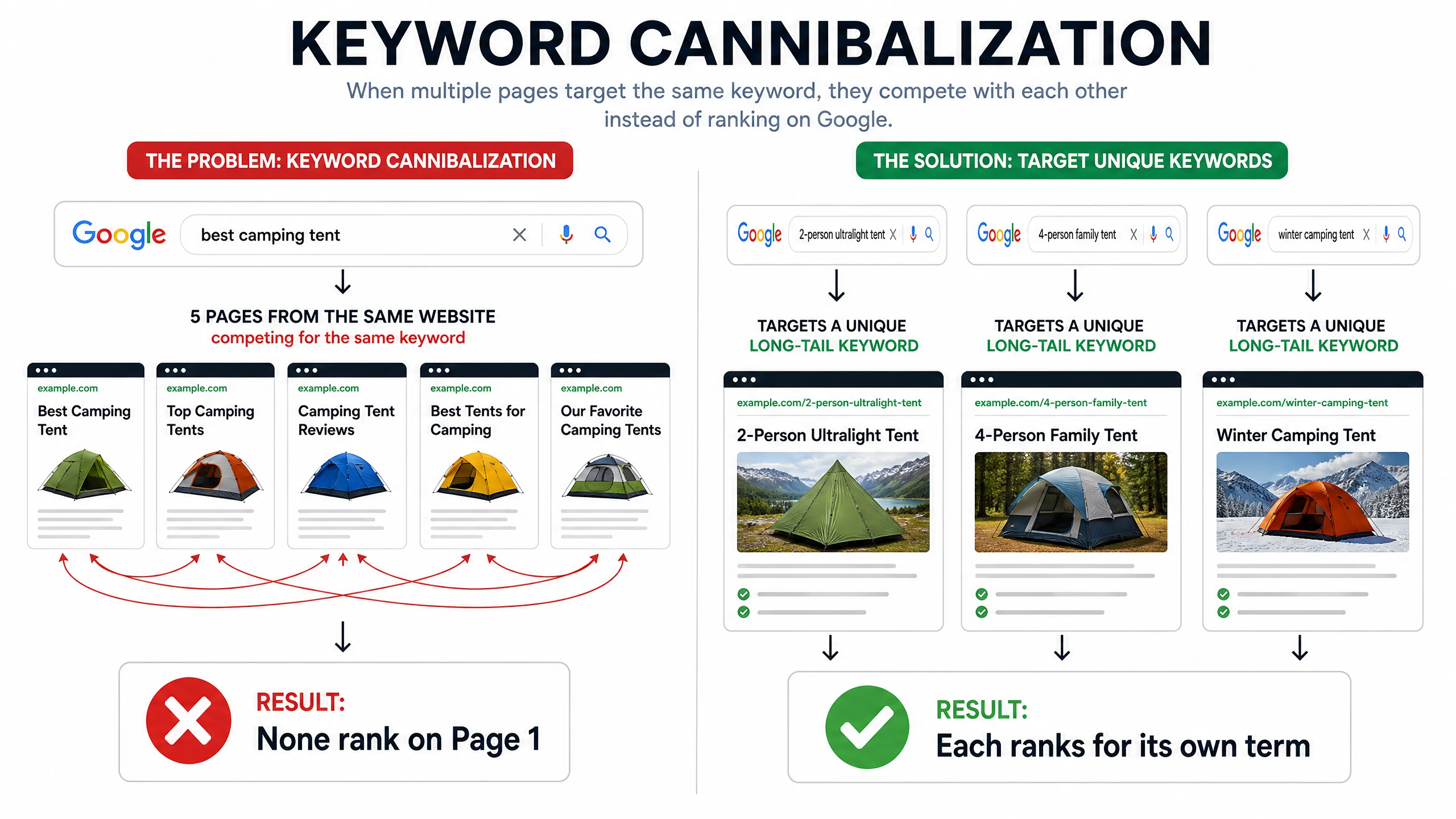
Beyond bad copywriting, there is a massive technical SEO risk that most “AI for Ecommerce” articles completely ignore: Keyword Cannibalization via Repetition.
AI models are trained to follow patterns. If you ask an AI to write 50 descriptions for 50 slightly different camping tents, it will likely use the exact same sentence structures and target the exact same primary keywords (e.g., “best camping tent”) for all 50 products.
When Google crawls your site, it sees 50 pages all competing for the exact same search intent. Google gets confused about which page is the “authoritative” one, so it ranks none of them. You end up cannibalizing your own traffic.
To use AI safely at scale, you must force the AI to diversify its vocabulary and target highly specific, long-tail keywords for each individual SKU.
The AI Ecommerce Copywriting Loop™ (Step-by-Step Solution)
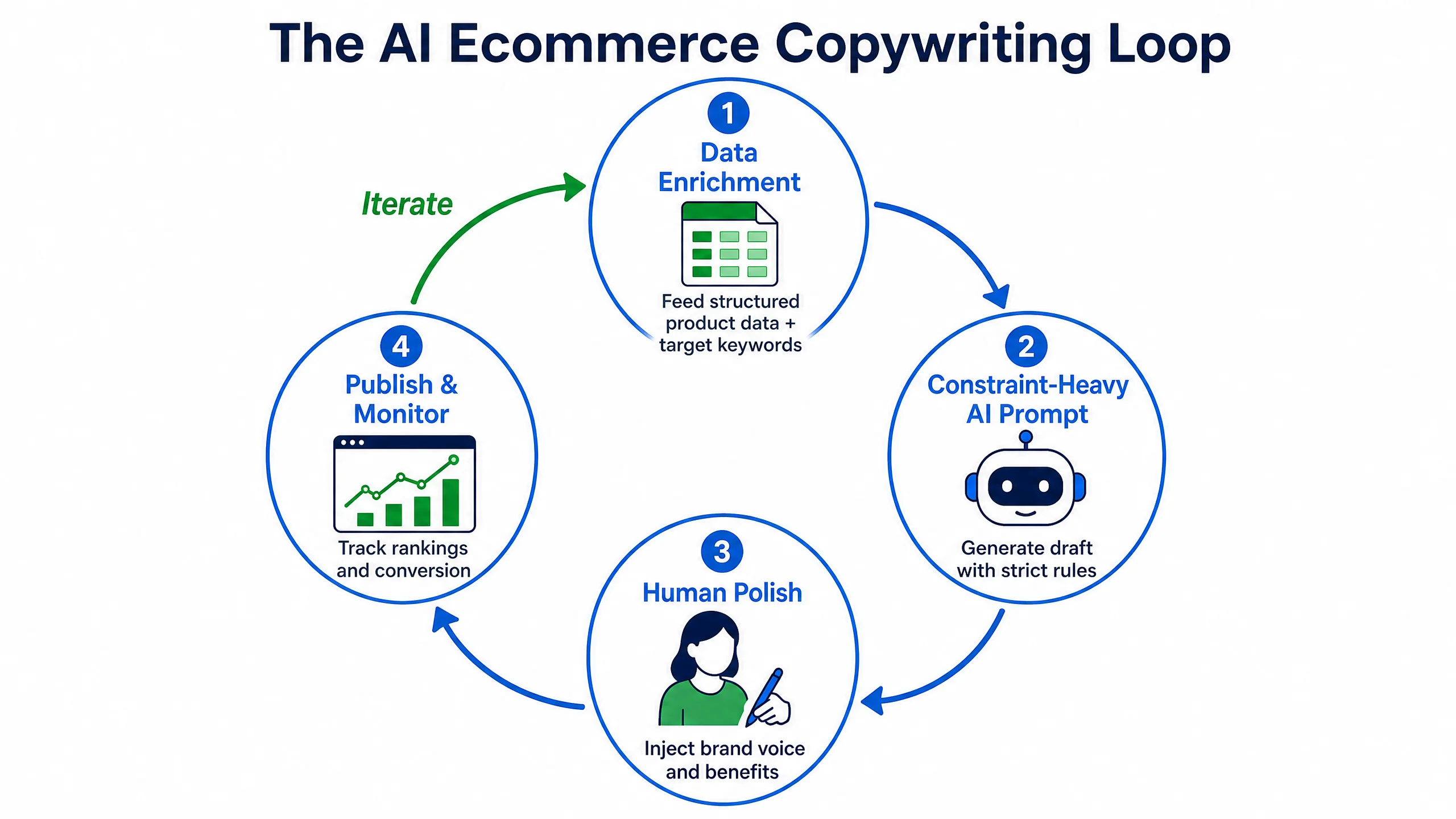
To solve this, we cannot rely on one-click Shopify apps. We need to build a controlled pipeline. I call this the AI Ecommerce Copywriting Loop™.
It uses a spreadsheet (like Google Sheets or Airtable), an API connection to an LLM (like Claude 3.5 Sonnet or GPT-4o), and a strict editorial process.
Step 1: The “Data Enrichment” Phase
Do not just give the AI a product name. You must feed it structured data.
In your spreadsheet, create columns for:
- Product Name
- Raw Features (e.g., 100% cotton, ethically sourced)
- Target Audience (e.g., eco-conscious millennials)
- Primary Long-tail Keyword (e.g., “sustainable cotton crewneck t-shirt”)
- The “So What?” (A brief human note on why this product matters).
Step 2: The “Constraint-Heavy” Prompt
This is the secret sauce. You must give the AI strict negative constraints.
The Prompt Template:
“You are an expert ecommerce copywriter for a brand that speaks to [Target Audience]. Write a product description for [Product Name].
Inputs:
Features: [Raw Features]
Core Value: [The “So What?”]
Keyword to include naturally once: [Primary Keyword]Constraints:
- Maximum 150 words.
- Start with a hook that addresses a specific problem the target audience faces.
- Translate the features into emotional benefits.
- DO NOT use any of the following words: unlock, elevate, crucial, game-changer, landscape, delve.
- Write at an 8th-grade reading level using short, punchy sentences.”
Step 3: The Batch Generation (Via API)
Using a tool like Make.com or Zapier, you can connect your spreadsheet to the OpenAI or Anthropic API. You click a button, and the API runs your prompt against all 400 rows in your spreadsheet, outputting the drafts into a new column.
Step 4: The “Human Polish” (Crucial)
This is where the magic happens. You do not import these directly into Shopify yet.
A human editor (you or a VA) goes down the list. Because the AI did the heavy lifting of structure and grammar, the human only needs to spend 30 seconds per product injecting “brand soul.” You tweak a joke, adjust a formatting issue, and ensure the keyword fits naturally.
You get the speed of AI with the quality control of a human.
Real Workflow Example: The Sustainable Gear Store
Let’s go back to my client with the outdoor gear store. We scrapped their 400 terrible AI descriptions and ran them through the AI Ecommerce Copywriting Loop™.
Here is how the Titanium Mug description changed.
The “One-Click App” Version (The Failure):
“Elevate your outdoor experience with our revolutionary titanium vessel. In today’s fast-paced world, hydration is crucial. This 12oz mug features folding handles for ultimate convenience…”
The “Copywriting Loop” Version (The Success):
“There is nothing worse than reaching into your pack and realizing your coffee mug crushed your extra pair of dry socks. We built this 12oz titanium camping mug to solve exactly that. The handles fold completely flat, meaning it slides into any empty corner of your bag. Weighing almost nothing, it’s the ultralight companion you won’t even notice you’re carrying—until you need that hot coffee at 6 AM on the trail.”
The difference is staggering. The second version tells a story, addresses a real human problem (crushed socks), and sounds like it was written by someone who actually goes camping.
Within 60 days of replacing the bad AI content with the human-polished AI content, their organic search traffic recovered, and the conversion rate on those specific product pages increased by 1.8%.
If you want to manage your ecommerce store effectively and have access to tools that integrate beautifully with these kinds of workflows, I highly recommend exploring Shopify’s ecosystem of advanced automation apps.
Mistakes To Avoid
- Using Cheap “AI Writer” Plugins: Most $9/month Shopify AI writer apps use outdated models and generic prompts behind the scenes. They are designed for speed, not quality. Build your own prompt in ChatGPT or Claude instead.
- Ignoring Meta Descriptions: Don’t just generate the main description. Have the AI generate a specific, 150-character SEO meta description for each product that includes the target keyword and a call to action.
- Forgetting Formatting: A massive wall of text won’t convert, even if it’s written beautifully. Ask the AI to format the output with a short introductory paragraph, followed by a bulleted list of 3 key benefits.
Advanced Optimization: Dynamic “Use Case” Variations
If you have a core product that appeals to vastly different audiences, don’t use one generic description. Use AI to generate variations based on traffic source.
For example, if you sell a heavy-duty blender:
- Variation A (For traffic coming from a “Smoothie Recipe” blog post): The AI description focuses on how perfectly it crushes ice and blends fruit without leaving chunks.
- Variation B (For traffic coming from a “Soup Recipe” blog post): The AI description focuses on the heating element and how it can blend and heat a soup simultaneously.
Using an advanced ecommerce platform, you can dynamically display the description that matches the user’s intent, drastically increasing the likelihood of a sale.
FAQ
Q: Will Google penalize my site if they detect AI content?
A: Google’s official stance is that they do not penalize AI content just because it is AI. They penalize “unhelpful, spammy content.” If your AI description is genuinely helpful, accurate, and provides a good user experience, it will rank. The “Human Polish” step ensures it meets this criteria.
Q: Which AI model is best for writing product descriptions?
A: As of 2026, Claude 3.5 Sonnet is widely considered superior to GPT-4 for copywriting. It follows negative constraints better (e.g., “don’t sound salesy”) and produces much more natural-sounding prose.
Q: How much time does this workflow actually save?
A: Writing a good description from scratch takes a human about 15-20 minutes. The AI Copywriting Loop takes about 2 minutes of setup per product, plus 1 minute of human editing. You reduce the time spent by roughly 80% while maintaining 95% of the quality.
Final Takeaways
AI is a tool, not an employee. If you hand it the keys to your Shopify store and walk away, it will drive your SEO off a cliff.
- Stop using one-click generators that produce “Feature Vomit.”
- Protect your SEO by ensuring the AI targets specific, unique long-tail keywords for every product to avoid cannibalization.
- Build a structured workflow using spreadsheets and APIs.
- Feed the AI strict negative constraints to eliminate robotic jargon.
- Always, always use a “Human-in-the-Loop” to inject brand soul before publishing.
Scale your output, but protect your brand’s voice.