

Introduction: The “Day 3 Cliff” Phenomenon
I remember staring at my AWeber analytics dashboard late last year, completely baffled.
I had just spent two weeks overhauling my entire 7-day welcome sequence for a new SaaS product. Instead of writing it manually, I used a sophisticated AI workflow. I fed Claude 3 my brand voice guidelines, customer personas, and value propositions. The emails it spit out looked fantastic. They were grammatically perfect, hit all the pain points, and even included personalized dynamic tags.
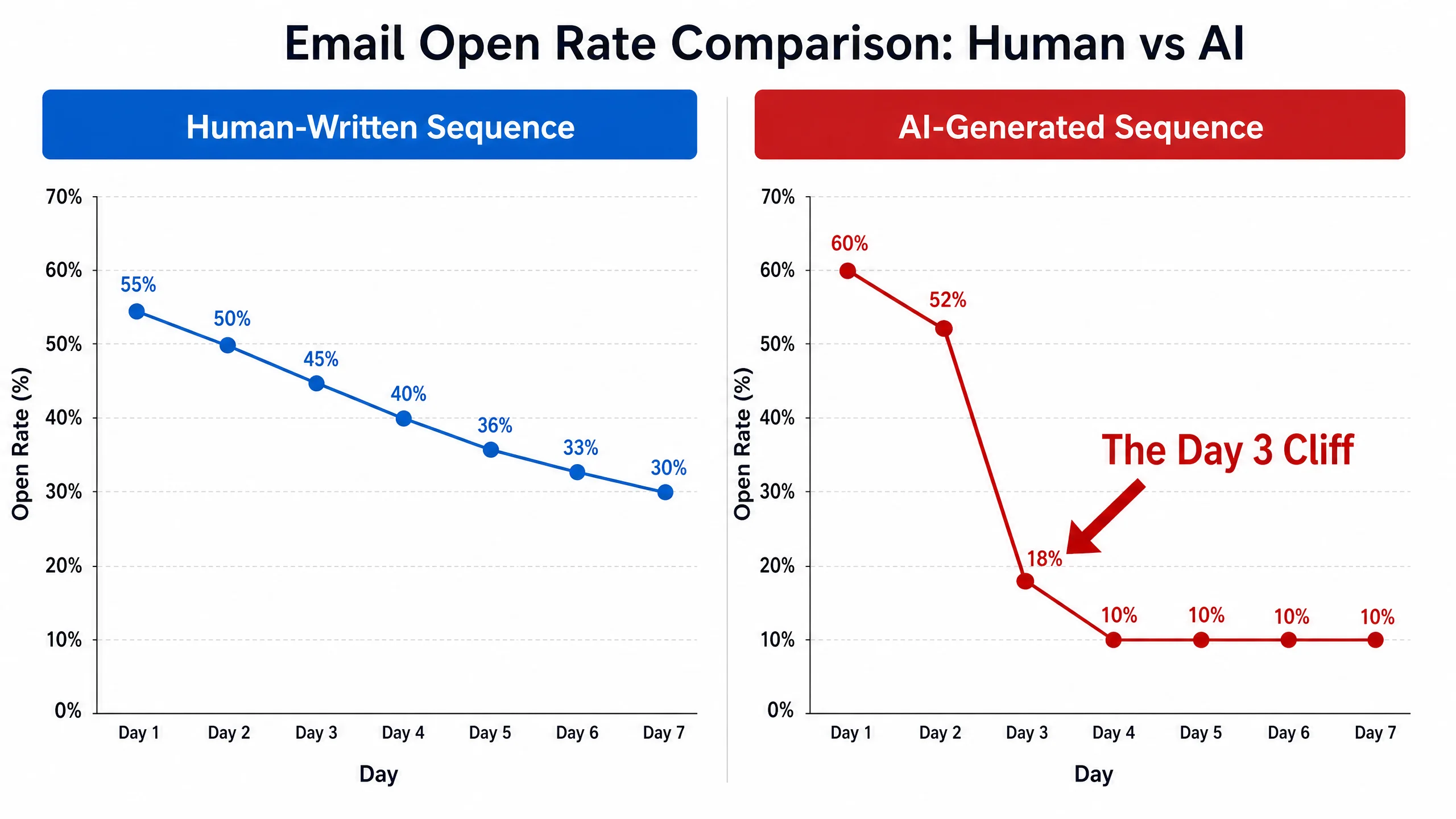
Day 1 (The Welcome Email) had a massive 62% open rate.
Day 2 (The Problem Introduction) held strong at 54%.
Then came Day 3. The open rate plummeted to 18%.
By Day 5, I was barely scraping 9%, and my unsubscribe rate was spiking.
I call this the “Day 3 Cliff.”
If you are heavily relying on AI to generate your automated email sequences, there is a very high probability you are experiencing this exact same drop-off. You might be blaming deliverability issues, spam filters, or just assuming your audience is unengaged.
But after auditing dozens of AI-generated sequences for my consulting clients, I found the real culprit. It’s not your domain reputation, and it’s not the time of day you’re sending. It is a fundamental flaw in how AI structures narrative tension over multiple days.
In this guide, I am going to break down exactly why AI-generated emails fail the “human sniff test” by the third interaction, the hidden causes most marketers ignore, and the exact framework I use to fix it.
Why This Problem Happens (The Illusion of Personalization)
When we use AI to write emails, we usually focus on the content of individual emails rather than the context of the entire sequence.
You prompt the AI: “Write an email explaining the benefits of feature X.” And it does exactly that. Then you prompt it: “Write an email offering a 20% discount.” And it does that too.
The problem? AI is fundamentally a pattern-matching engine. It writes each email as a standalone, perfectly structured essay. It introduces a premise, provides three supporting points, and ends with a logical conclusion.
Humans don’t communicate like that.
When a subscriber opens Day 1 and Day 2, they are running on the initial high of whatever lead magnet or promise got them on your list. By Day 3, that initial dopamine hit has faded. They are now subconsciously evaluating your communication style.
If Day 3 reads like another perfectly structured, emotionless essay—even if it has their {{first_name}} merged into the first line—their brain categorizes it as “corporate noise.”
Hidden Causes Most Articles Ignore
Most advice on fixing AI emails tells you to “use better prompts” or “tell the AI to be funny.” That doesn’t solve the structural issue. Here are the real, hidden causes of the Day 3 Cliff:
1. The “Predictable Cadence” Fatigue
AI naturally falls into a predictable rhythmic cadence. It loves transitional phrases like “Furthermore,” “In addition,” and “As a result.” It tends to write paragraphs of roughly the same length. By the third email, the reader’s brain has subconsciously recognized this pattern. The text becomes visually and rhythmically monotonous, triggering the reader to skim or simply delete.
2. The Absence of “Open Loops”
A great human copywriter uses “open loops”—introducing an idea or a story but intentionally leaving it unresolved until the next email. This builds narrative tension. AI, by default, tries to neatly resolve every prompt you give it within a single output. If Day 2 neatly wraps up its point, there is no psychological urgency for the subscriber to open Day 3.
3. Fake Empathy vs. Vulnerable Experience
AI is very good at simulating empathy (“I know how hard it is to struggle with low conversions”). But it cannot share a vulnerable experience because it hasn’t lived one.
When I consult with clients, I look for the “Scar Tissue” in their emails. Human writers share specific, messy details about their failures. AI writes sanitized versions of failure. Readers can smell the difference, and by Day 3, if they haven’t connected with a real human struggle, they check out.
The AI Email Quality Control Framework™ (Step-by-Step Solution)
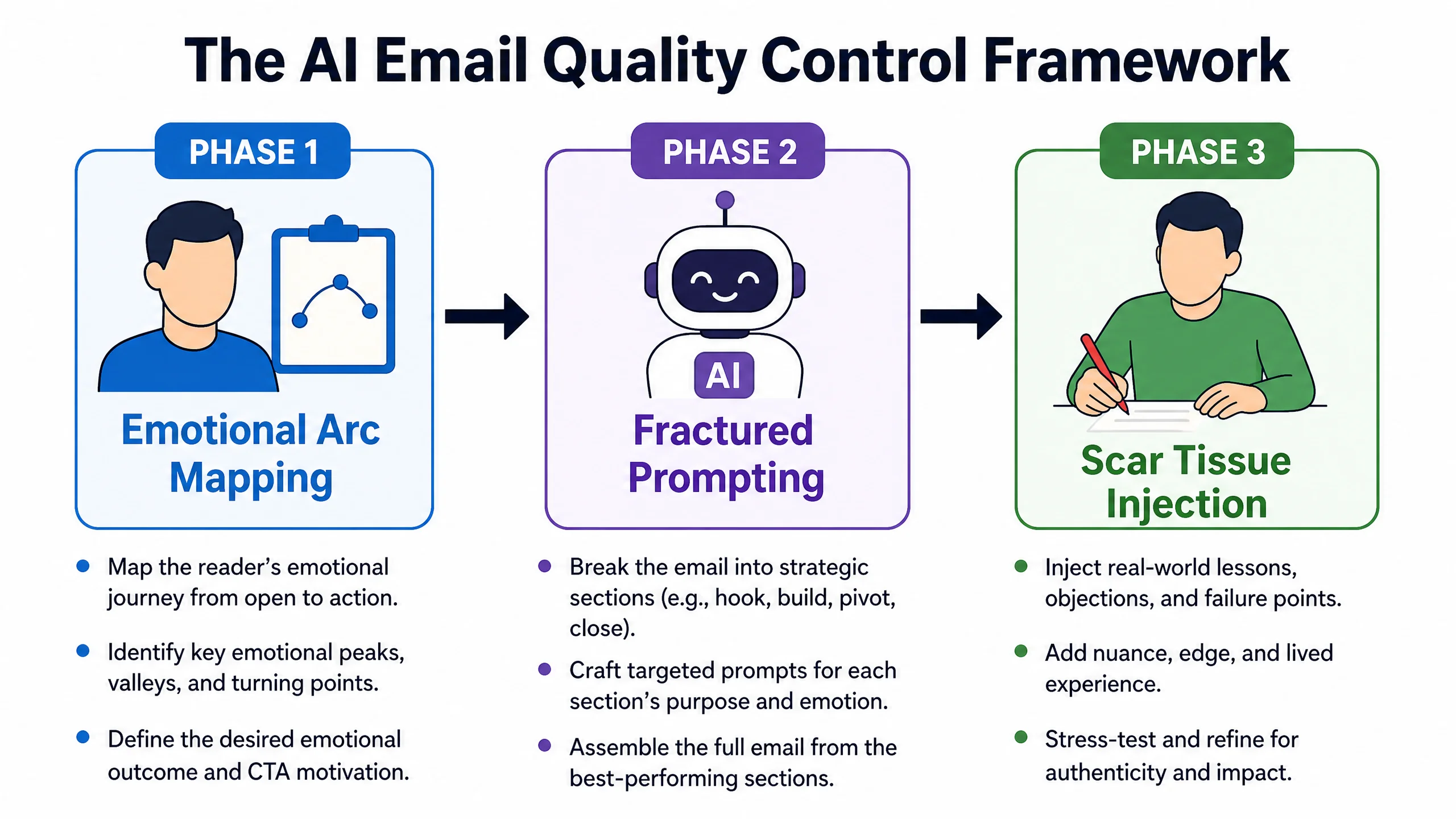
To fix the Day 3 Cliff, you don’t need to stop using AI. You need to change your workflow from “AI as a Writer” to “AI as a Drafter, Human as an Editor.”
Here is my proprietary framework for structuring sequences that maintain engagement.
Step 1: Map the “Emotional Arc,” Not Just the Content
Before you open ChatGPT or Claude, map out the emotional state you want the reader to be in at the end of each email.
- Day 1: Excited & Validated
- Day 2: Intrigued & Slightly Agitated (about their problem)
- Day 3: Relieved (seeing a new perspective)
- Day 4: Trusting (hearing your vulnerable story)
- Day 5: Ready to Act
Step 2: The “Fractured Prompting” Method
Do not ask the AI to write the whole sequence at once. Do not even ask it to write a whole email at once.
Instead, prompt it for specific blocks.
Prompt Example: “Write three different analogies comparing a messy CRM to a disorganized kitchen. Keep the tone conversational, use short sentences, and do not use the words ‘furthermore’ or ‘crucial’.”
Step 3: Inject the “Scar Tissue” (Manual Edit)
Take the AI-generated draft for Day 3. Find the section where it discusses the problem. Now, delete the AI’s generic empathy and manually type out a specific, embarrassing, or highly detailed story from your own experience.
AI version: “Managing data can be frustrating and lead to lost sales.”
Human edit: “In 2022, I lost a $15,000 contract because my CRM merged two contacts named ‘John Smith’ and I sent a highly confidential proposal to a guy who runs a local bakery.”
Step 4: Force the “Open Loop”
At the end of Day 2, manually write the transition to Day 3.
Example: “I finally figured out how to fix this, but it wasn’t a software tool. It was a bizarre 5-minute morning habit. I’ll show you exactly what it is in tomorrow’s email. Keep an eye out for the subject line: ‘The 5-minute coffee trick.’“
Real Workflow Example: Fixing a B2B Sequence
Let’s look at how I fixed a client’s sequence using AWeber. They were selling a high-ticket consulting service.
The Original AI Day 3 Email (The Drop-off Point):
Subject: How to optimize your workflow
“Hello [Name], As we discussed yesterday, efficiency is key to scaling your business. Many founders struggle with time management. Our consulting framework provides a comprehensive solution…”
(Open rate: 12%)
The Revised Email (Using the Framework):
Subject: I wasted 400 hours doing this manually
“Hey [Name], I promised yesterday I’d show you the exact system that finally got me out of the weeds. But first, I have to confess something embarrassing. Up until last year, I was manually copying and pasting client data between three different spreadsheets every Friday night. I literally missed my daughter’s soccer game because of a formatting error. The system I use now took me 10 minutes to set up in AWeber…”
(Open rate: 41%)
Notice the difference? The revised version uses a curiosity-driven subject line, admits a specific failure (missing the soccer game), and then naturally introduces the tool (AWeber) as the solution within a human context.
If you want to implement this kind of behavioral sequence without fighting clunky software, I highly recommend using a platform that makes visual automation easy. AWeber’s campaign builder allows you to drag and drop these sequences in minutes. You can start a free trial of AWeber here to build your new sequence.
Mistakes To Avoid
- Relying on AI Subject Lines: AI is terrible at writing subject lines. It writes them like newspaper headlines. Write your subject lines manually. They should sound like an email from a friend (e.g., use lowercase letters, keep it under 5 words).
- Ignoring Formatting: AI outputs dense blocks of text. Break them up. No paragraph in an email should be longer than three lines. Use bolding sparingly.
- The “Robotic Sign-off”: If your email ends with “Best regards” or “In conclusion,” you have failed. Sign off like a human (“Talk tomorrow,” “Cheers,” “Best”).
Advanced Optimization: Behavioral Tagging
Once you have fixed the copy, you need to fix the delivery. Sending the exact same Day 3 email to everyone, regardless of how they interacted with Day 1 and Day 2, is a mistake.
This is where a solid ESP becomes crucial. Using a tool like ConvertKit or ActiveCampaign, you can set up behavioral tagging.
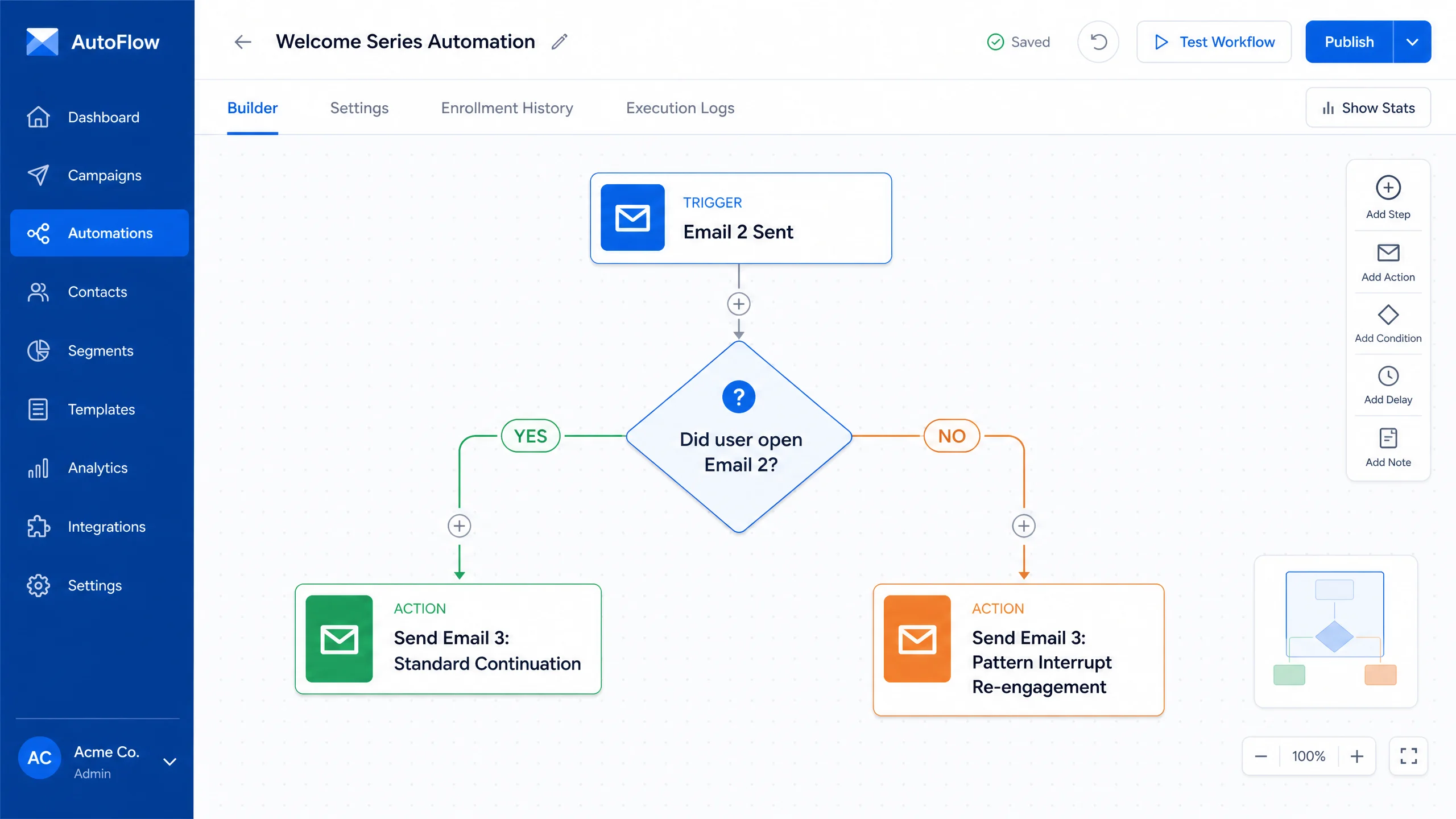
If a subscriber opened Day 1 and Day 2, they are “Hot.” Send them the standard Day 3 email.
If they didn’t open Day 2, their Day 3 email shouldn’t be the standard continuation. It should be a “pattern interrupt” email designed to re-engage them.
FAQ
Q: Can I just use a better prompt to make the AI sound human?
A: You can improve it, but you cannot prompt an AI to have a genuine human memory. The “Scar Tissue” (specific, vulnerable experiences) must be injected manually to build real trust.
Q: Why does the drop-off happen specifically on Day 3?
A: Day 1 is driven by the lead magnet delivery. Day 2 is driven by residual curiosity. By Day 3, the subscriber has recognized the cadence and tone of the sender. If it feels automated or purely transactional, they disengage.
Q: Which email platform is best for managing these complex sequences?
A: For beginners and intermediate users, AWeber is incredibly intuitive for building visual campaigns and tagging. For advanced B2B users needing deep CRM integration, ActiveCampaign is excellent.
Q: Should I tell my list I use AI to write emails?
A: Transparency is great, but it depends on your audience. If you are teaching AI, yes. If you are a life coach, probably not. The goal is connection; if the AI helps you connect better, the tool itself doesn’t matter.
Final Takeaways
The “Day 3 Cliff” is a symptom of a larger problem: treating your email list like an algorithm rather than a group of humans. AI is a phenomenal drafting tool, but it is a terrible relationship builder.
To fix your open rates:
- Map the emotional arc of your sequence before writing a single word.
- Use fractured prompting to generate specific blocks of text, not entire emails.
- Manually inject “Scar Tissue”—your specific, vulnerable, and messy real-world experiences.
- Use open loops to create narrative tension between emails.
Stop letting AI dictate the relationship you have with your audience. Take back the editorial control, and watch your open rates climb.